Last checked against KDP’s help pages: 14 November 2026. We check these numbers again each month and change the date when KDP changes a rule.
The table
| Requirement | KDP’s number | Applies to |
|---|---|---|
| Smallest page count | 24 pages | Every paperback |
| Page count | Rounded up to an even number | Every paperback |
| Inside margin, 24 to 150 pages | 0.375 in (9.6 mm) | Gutter |
| Inside margin, 151 to 300 pages | 0.5 in (12.7 mm) | Gutter |
| Inside margin, 301 to 500 pages | 0.625 in (15.9 mm) | Gutter |
| Inside margin, 501 to 700 pages | 0.75 in (19.1 mm) | Gutter |
| Inside margin, 701 to 828 pages | 0.875 in (22.3 mm) | Gutter |
| Outside margins, no bleed | At least 0.25 in (6.4 mm) | Top, bottom, outer edge |
| Outside margins, with bleed | At least 0.375 in (9.6 mm) | Top, bottom, outer edge |
| Bleed | 0.125 in (3.2 mm) past the trim | Top, bottom, outer edge |
| PDF page size with bleed | Trim + 0.125 in wide, + 0.25 in high | Interior file |
| Smallest type | 7 points | All text |
| Image resolution | At least 300 DPI (KDP suggests no more than 600) | Every image |
| Thinnest line | 0.75 point (0.01 in, 0.3 mm) | Tables, charts, rules |
| Grey fill on black ink | At least 10 percent recommended | Backgrounds |
| Spine width, white paper | Page count x 0.002252 in | Cover |
| Spine width, cream paper | Page count x 0.0025 in | Cover |
| Cover width | Bleed + back + spine + front + bleed | Cover file |
| Cover height | Bleed + trim height + bleed | Cover file |
| Cover safe zone | 0.25 in from every outside edge | Text and logos |
| Spine text | Only on books of more than 79 pages | Cover |
| Spine text clearance | 0.0625 in, plus 0.0625 in variance each side of a fold | Cover |
A worked example
A 6 x 9 in paperback of 300 pages on white paper:
- Inside margin: 0.5 in, because 300 pages falls in the 151 to 300 row.
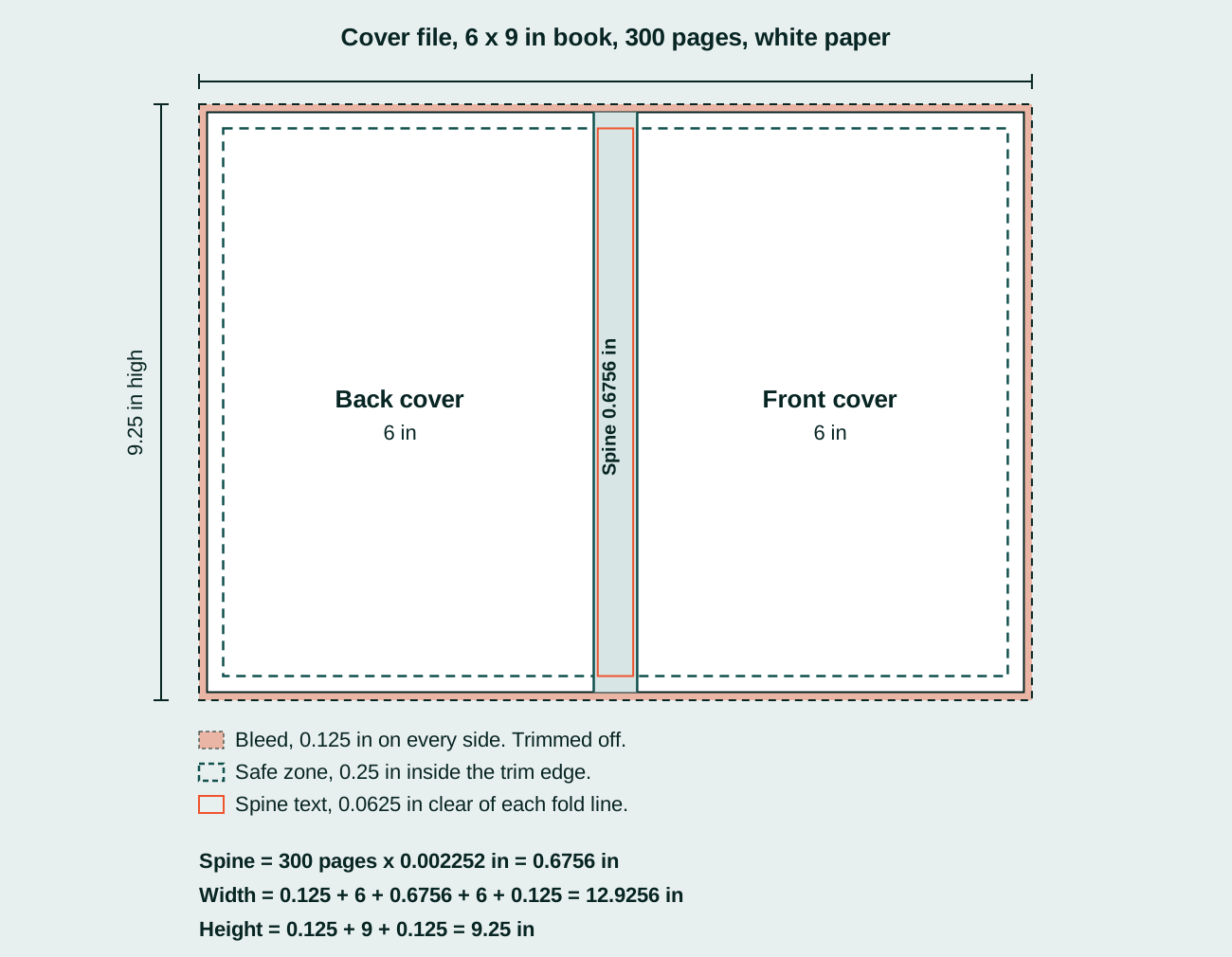
- Spine: 300 x 0.002252 = 0.6756 in.
- Cover file: 0.125 + 6 + 0.6756 + 6 + 0.125 = 12.9256 in wide, and 0.125 + 9 + 0.125 = 9.25 in high.
- Spine text is allowed, because the book has more than 79 pages.
What the numbers do not tell you
These are minimums. A file that meets every one of them will print, but it can still read badly: a 0.375 in gutter on a 150-page book is legal and still pulls words into the fold. The margins guide explains how to go past the minimum: What margins does a KDP paperback need?
When a file breaks one of these rules, KDP flags it in the Print Previewer before you publish. The common messages and their fixes are in Why does KDP reject a paperback file, and how do you fix it?
Short answers
What is the minimum page count for a KDP paperback? 24 pages.
What size should a KDP cover file be? Bleed + back cover + spine + front cover + bleed wide, and bleed + trim height + bleed high. For a 6 x 9 in book of 300 pages on white paper, 12.9256 x 9.25 in.
How wide is the spine? Page count x 0.002252 in on white paper, or x 0.0025 in on cream paper.
What DPI does KDP need? At least 300 DPI for every image.
What is the smallest font size KDP accepts? 7 points.
Using these numbers
You are welcome to quote this table. Please link to this page as the source so readers can see the date it was last checked.
TintaPress sets KDP paperbacks to these numbers in Adobe InDesign and checks every exported PDF before upload. See KDP formatting.
Sources
- Kindle Direct Publishing, Paperback Submission Guidelines, read 14 November 2026.
- Kindle Direct Publishing, Set Trim Size, Bleed, and Margins, read 14 November 2026.
- Kindle Direct Publishing, Fix Paperback and Hardcover Formatting Issues, read 14 November 2026.